



July 23, 2026 By The Scale Rankings

| Your website may not be showing on Google because it hasn't been indexed, Google can't crawl your pages, or your site isn't ranking well enough for relevant searches. Common causes include technical SEO issues, noindex tags, blocked crawlers, thin content, poor keyword targeting, slow page speed, or a lack of backlinks and authority. |
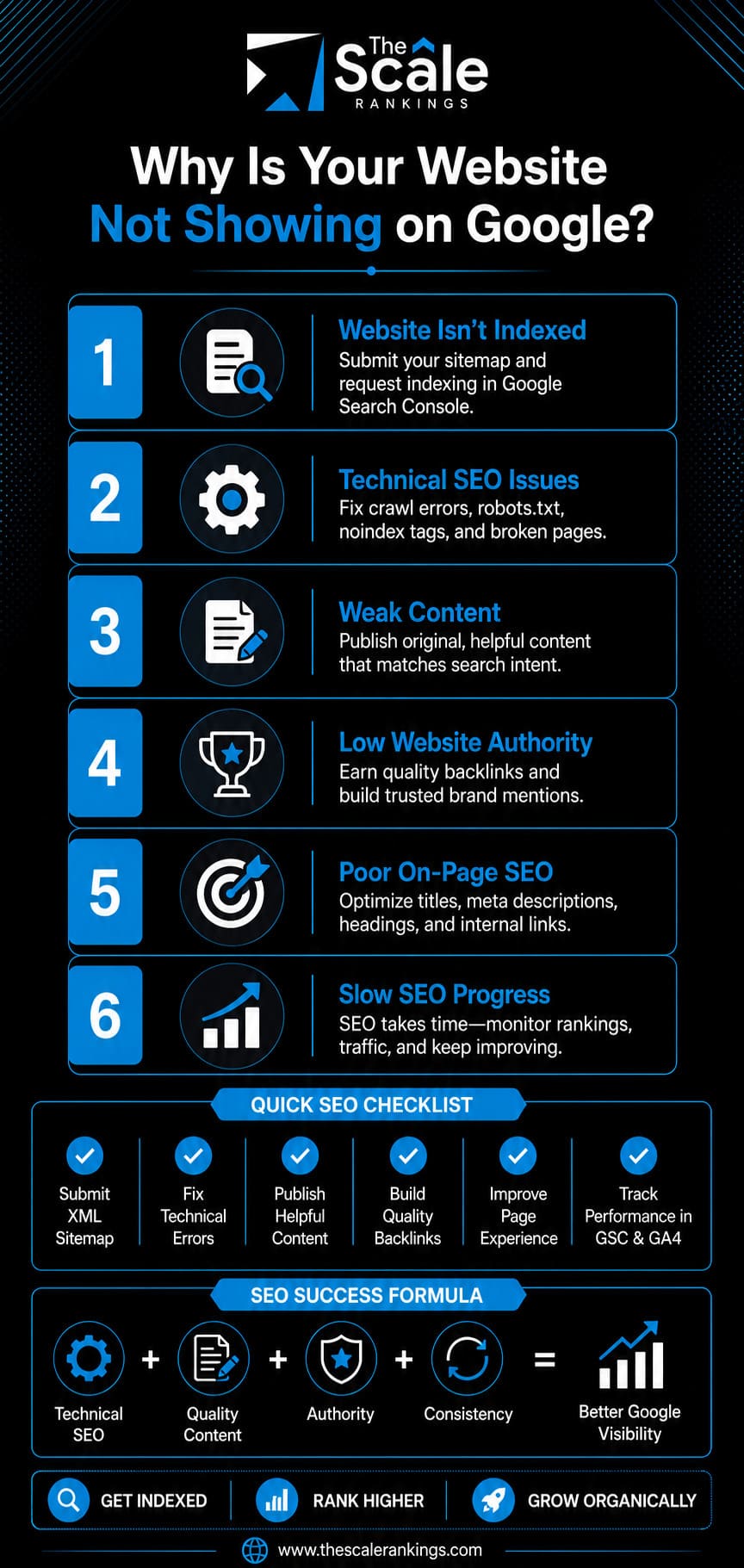
If your website is not showing up on Google and it is affecting your business, the reasons are almost always identifiable and fixable with the right SEO approach. It covers everything from indexing and crawlability issues to technical SEO, content quality, page speed, backlinks, and ranking problems.
But…How to know if your website is not showing up on Google?
Search site:yourdomain.com on Google. Now look at what comes back. If your website not showing in Google search, this simple test is the fastest way to determine whether the problem is indexing or ranking.
| S.No. | Reason | What It Means | Fix Complexity |
| 1 | Not yet indexed | Google hasn't discovered or processed your site yet | Easy - submit sitemap + request indexing |
| 2 | robots.txt blocking | A Disallow rule is locking Googlebot out | Easy - edit robots.txt |
| 3 | Noindex tag active | Tag tells Google to ignore the page | Easy - remove the tag |
| 4 | Google penalty | Manual or algorithmic action suppressing the site | Medium - fix violations + reconsideration |
| 5 | Duplicate content | Google only indexes the canonical version | Medium - set canonical tags |
| 6 | Thin or low-quality content | Helpful Content System skipped the page | Medium - rewrite and expand |
| 7 | Wrong keyword targeting | Targeting terms with zero searches or too competitive | Easy - keyword research |
| 8 | Poor or missing on-page SEO | Google can't determine what the page is about | Easy - on-page optimization |
| 9 | Slow page speed / poor CWV | Crawl budget wasted; ranking suppressed | Medium - performance fixes |
| 10 | No authority or backlinks | Google has no third-party trust evidence | Ongoing - link building + entity building |
Indexed but still not ranking? That is a different diagnosis.
Our experts found that 96.55% of indexed pages get zero organic traffic. Indexing can take days to weeks, and ranking can take 3-6 months. So if your pages show up in a site: search but not for the keywords you want to rank for, the problem is with rankings, not indexing. This guide by The Scale Rankings experts explains the problem and its solutions.
Understanding why your website isn’t showing up on Google is the first step toward fixing the issue and improving your online visibility. These problems can arise due to a new website that Google hasn't discovered, a robots.txt file or a noindex tag preventing indexing, technical SEO errors, thin or low-quality content, poor keyword targeting, slow page speed, a Google penalty, duplicate content, or a lack of backlinks and website authority. Here are the most common reasons:
New websites are typically discovered when search crawlers follow links from other websites. Your website's discoverability is still low because Google has not found enough paths leading to it. Search Engine Optimization (SEO) can help new sites be indexed within a few days to a couple of weeks, while meaningful rankings take 3-6 months. This is the most common cause for sites under two months old.
You can verify it by running site:https://www.yourdomain.com. Zero results on a brand new site almost always point to indexing issues, rather than a broken website.
How to fix it?
Also, get a single link from any site Google already crawls, like a social profile, a local directory, or a supplier page. That gives Googlebot a path to your door. These steps significantly improve the chances of seeing your website appear in Google search much sooner.
The robots.txt file lives at https://www.yourdomain.com/robots.txt and tells crawlers where they can and cannot go. Incorrect rules can also contribute to crawl errors, preventing Googlebot from accessing important pages. A single incorrect rule can prevent Google from crawling your entire website. This happens most often after a site migration, a redesign, or a developer change, when a "block everything" rule from the staging site gets carried over to the live one.
You can confirm this by visiting yourdomain.com/robots.txt in your browser. Look for these lines:
If you see a bare "Disallow: /" under "User-agent: *". That's likely the cause.
How to fix it?
Remove or correct the offending line. If you want Google to crawl everything, the file can allow all bots. After editing, open Search Console, use the robots.txt report to confirm the block is gone, then request indexing again. Server errors can also block crawling. If your website frequently returns 5xx server errors, Googlebot may stop crawling affected pages until the server becomes stable. Check your hosting logs or Search Console's Pages report for server-related indexing issues.
While you are in there, check one more thing that most guides miss. Look for rules blocking AI crawlers like GPTBot, PerplexityBot, and ClaudeBot. Blocking those keeps you out of AI answers, which matters more every month. More on that near the end. If robots.txt edits feel risky, our technical SEO experts handle this exactly.
A noindex tag is a small piece of code that tells Google, in plain terms, do not include this page in search. Developers add it on purpose during a build to keep unfinished pages hidden. The problem is that it often gets left in place at launch, and then the whole site stays invisible.
For WordPress users, there is one specific culprit worth calling out. A checkbox under Settings, then Reading, labeled "Discourage search engines from indexing this site." When that box is ticked, WordPress quietly adds noindex across your whole site. It is the single most common reason WordPress websites never show up on Google.
To confirm this, right-click your page, choose View Page Source, then press Ctrl+F (or Cmd+F on a Mac) and search for the word "noindex." If it appears, that page is being hidden. You can also check in Search Console under Pages, where the reason will read "Excluded by noindex tag."
How to fix it?
Once removed, request indexing in Search Console so Google recrawls the page quickly.
A website's visibility can drop in two ways. A manual action is a human reviewer on Google's spam team flagging your site, usually for manipulative links or spammy content. An algorithmic suppression happens automatically during a core or spam update. Either one can push your site partly or completely out of results. If your site was showing up before and suddenly vanished, this is a prime suspect.
You can check it by opening Search Console. Then go to Security and Manual Actions, then Manual Actions. If something is listed, Google tells you exactly what and why. For an algorithmic hit, note the date your traffic dropped and compare it against Google's update history. The March 2026 core update alone changed rankings for roughly 73% of sites, so timing is a strong clue.
How to fix it?
Suspecting a penalty but not sure where it came from is a good moment to bring in help. A professional SEO agency can trace the cause with tools you may not have.
When several URLs show nearly identical content, Search engines usually select one version as the canonical page. The trouble is that Google's pick may not be the page you wanted people to find. Common causes are sneaky and technical: www versus non-www, http versus https, trailing slashes, and printer-friendly versions all create duplicate copies of the same page.
To check this, go to Search Console, use the URL Inspection tool on a page, and look at the "canonical" Google selected. If it points somewhere other than your intended URL, duplication is your issue.
How to fix it?
The Helpful Content system evaluates whether a page genuinely helps users. Pages with little real text, generic filler, or content copied from elsewhere often get skipped entirely. Here is the part that surprises people: this system works sitewide. A pile of thin pages in one corner of your site can drag down good pages everywhere else.
You can verify it by reading your own pages honestly. Does each one fully answer a real question? Would a visitor get something here they could not find just as easily somewhere else? If the honest answer is no, that page is likely a drag.
How to fix it?
That last point is the difference maker. A line like "on a client site with 3,000 monthly visitors, fixing this lifted traffic 24% in six weeks" signals first-hand experience in a way generic copy never will.
Many owners write their site from their own point of view instead of their customer's. The result is pages built around clever brand phrases nobody searches, or head terms so competitive that established brands with thousands of links own every spot. Either way, your page looks invisible because it never had a realistic shot at the terms it targets.
To check it, type your target keyword into Google. Who ranks? If it is giant brands with years of authority, that term is a long shot for now. Then ask the harder question: is anyone actually searching your exact phrase, or did you invent it?
How to fix it?
These are among the important Google ranking factors that directly influence your search visibility. Getting the target right comes before everything else.
Search engines rely on clear signals to understand what a page is about. A page with no title tag, no proper heading, and no keyword in the text gives Google almost nothing to work with, so it struggles to match you to any query. This is one of the quickest SEO improvements you can make.
To check this, look at three things on your page. The title (the text in the browser tab), the main H1 heading, and the first paragraph. Does your target topic appear naturally in all three? A free SEO browser extension will also flag missing title tags and meta descriptions in seconds.
How to fix it?
Cover these on-page basics, which double as best practices of SEO and the foundation of search engine optimization (SEO) for any page:
Small changes, quick to make, and they often unlock indexing on their own.
Speed affects two things at once. Google gives slower websites a smaller crawl budget, meaning fewer pages may be crawled and indexed during each visit. Since Google switched to mobile-first indexing, it judges the speed of your mobile version, not your desktop one, and phones are less forgiving.
You can check this by running your homepage and top pages through PageSpeed Insights at pagespeed.web.dev. Aim for these targets:
How to fix it?
Google mainly demotes the slowest experiences, so getting into the healthy range is enough. Our technical SEO team can handle the heavier fixes here.
Backlinks remain one of the strongest trust signals used by search engines. A site with zero backlinks has no outside vote of confidence, so Google has little reason to promote it over established competitors. New domains under six months feel the hardest. Even with flawless on-page SEO, a brand new site struggles to rank without some external trust.
To verify, use a free tool from Ahrefs or Moz to check your referring domains count. If it is zero or near zero, authority building is your bottleneck.
How to fix it?
Quality matters far more than quantity. You need a few good, relevant ones to get started. These are some of the most reliable ways to show or rank your website when you are starting from zero authority, and they double as the fastest route for how to get your website to show up on Google:
If you are still wondering how to get website to show up on Google, building authority alongside technical SEO can help. Building authority steadily improves your organic visibility over time. Local businesses especially can move fast here, and our local SEO services focus on exactly these first wins.
Google AI Overviews now appear on roughly half of all searches. According to BrightLocal's 2026 Survey, 45% of consumers now use AI tools like ChatGPT to find business recommendations. This is up from just 6% a year earlier. This makes AI the third most popular way people discover businesses, behind only Google and Facebook. Here is the proof:
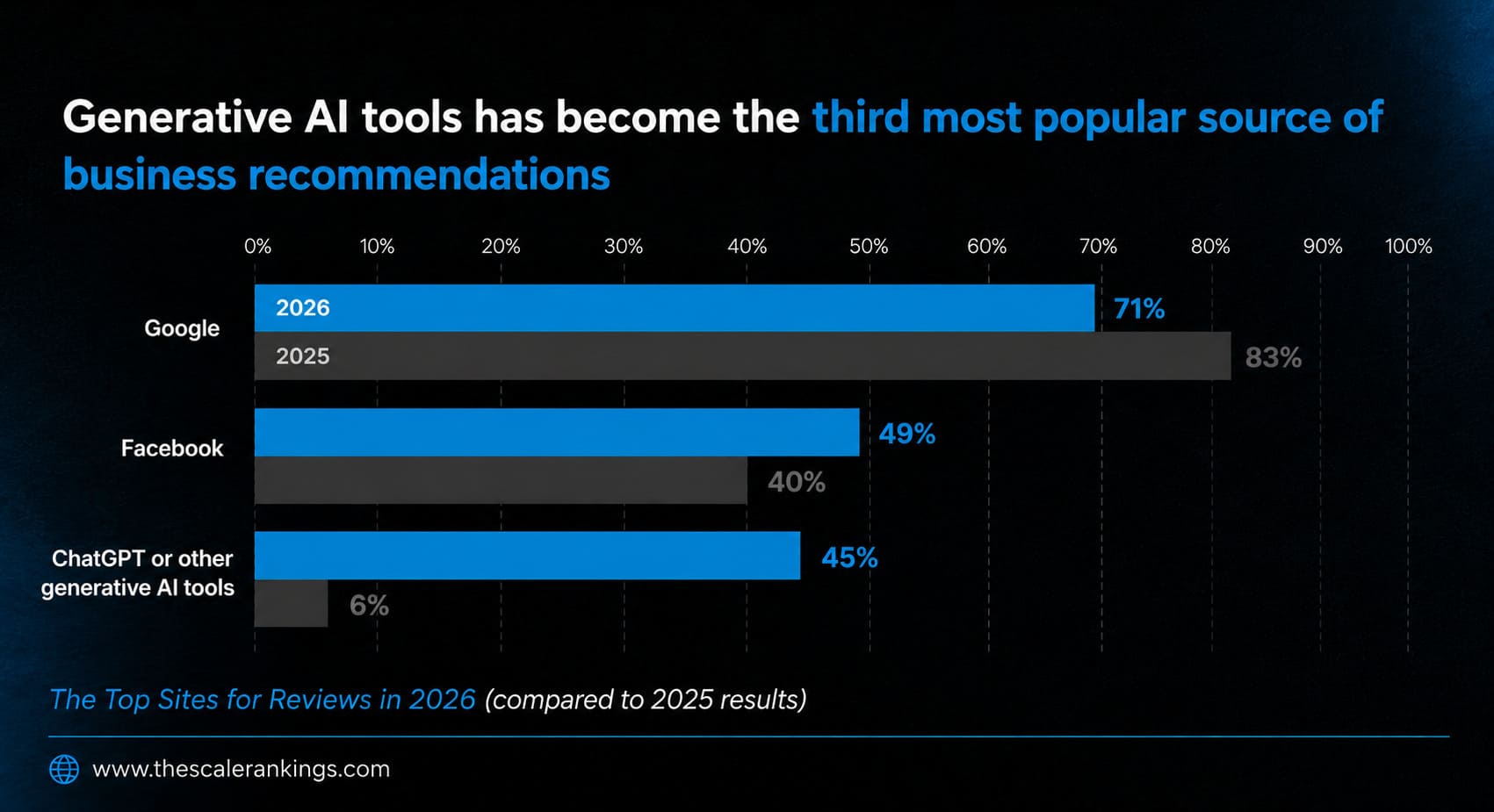
So a huge share of businesses are missing from AI answers entirely, even ones that rank fine on Google. The good news is that the same fixes above help here too. Thin content, no authority, and weak technical structure impact AI just as much as in Google. But AI adds a few requirements of its own:
Missing from AI answers too? This is the work behind generative engine optimization (GEO) and answer engine optimization (AEO). If your brand is not showing in ChatGPT or other search engines, that is a specific gap worth its own diagnosis. By this stage, you should have a much clearer understanding of why your website is not showing up on Google and which fixes seek your attention first.
Most technical fixes can show results within days or weeks because Google only needs to recrawl your website. Improvements related to content quality, backlinks, and authority usually take several months because Google needs time to evaluate long-term trust signals.
| Fix type | Expected timeline | What speeds it up |
| Technical block (noindex, robots.txt) | Hours to days | Request indexing in Search Console right after |
| Indexing submission | Days to 2 weeks | Sitemap submitted plus one external link |
| On-page SEO improvements | 2 to 6 weeks | Strong internal linking and fresh content |
| Content quality rebuild | 4 to 12 weeks | Publishing consistently and earning links |
| Authority building | 3 to 6+ months | Quality backlinks and steady publishing |
| Penalty recovery | 6 to 12 weeks after the fix | A thorough fix plus a reconsideration request |
Technical fixes usually produce results faster because Google only needs to recrawl and process your pages. Improvements related to content quality, authority, and trust take longer because Google needs to observe consistent positive signals before rankings improve.
If your website is not showing up on Google yet, the cause is more than a basic SEO checklist can cover. And even when you do appear on Google, are you also showing up in the AI answers? The Scale Rankings covers both layers with search engine optimization services built for how search actually works now:
If you have worked through these fixes and your website is still missing, our SEO specialists can help you identify the underlying issue with a full technical and content audit. If you are unsure where to begin, booking an SEO consultation can help you know the exact issues. Once your site improves its search visibility, the next goal is sustainable growth.
The Scale Rankings is your go-to partner for all things SEO. We focus on crafting personalized SEO strategies that deliver real results, from boosting your rankings to increasing organic traffic. With our expertise in on-page SEO, off-page SEO, and technical SEO, we ensure your brand stands out in the digital crowd.
The Scale Rankings ensures to make sure your audience finds exactly what they’re looking for. As one of the best search engine optimization (SEO) companies, we dig into the core of your business, crafting strategies that hit home across industries. Our services include:
 Let’s Chat
Need help with your next SEO project? Our experts are here to help. Reach out to us for a free consultation or more information.
 +1 877 33 SCALE
 [email protected]
 1870 The Exchange SE Ste 220 PMB 47489, Atlanta, GA 30339-2171



 Local SEO
 E-Commerce SEO
 International SEO
 SEO Consulting
 Conversion Rate Optimization
 Content Marketing
 Content Strategy
 Website Content
 Answer Engine Optimization
 Amazon SEO
 Generative Engine Optimization
 AI Citation Building
 Entity SEO